Quota Ledger
Doc Version: 1.0.0 Last Updated: 2026-09-06 Git Commit: - Author: Lincoln
Overview
JAiRouter ships a quota ledger: it tracks request counts and token usage across multiple time windows (minute / hour / day / month) in the request path. When enabled, the ledger also drives limit enforcement against existing API Key limits.
Operator workflow (where limits live)
| Step | Where | What it does |
|---|---|---|
| 1. Set limits | Security → API Keys edit form | dailyRequestLimit / dailyTokenLimit / rateLimitPerMinute / quotaAlertThreshold — not on the Quota config page |
| 2. Enable ledger (optional) | Traffic → Quota Runtime Config /config/quota | Hot-edit enabled / failOpen / windows; ledger defaults to off |
| 3. Observe usage | Observability → Usage → Quota Usage /monitoring/quota | Multi-dimensional usage + limit/progress columns |
| 4. Alerts & reset | Security → API Keys | Quota alerts list, reset daily counters |
- Limit mapping: DAY window → daily request/token caps; MINUTE window → rate limit;
0means unlimited. With the ledger off, API Key auth still enforces the same limits via in-memory counters + token bucket.
Off by default (opt-in):
jairouter.quota.enableddefaults tofalse— zero behavior change. No accumulation, no database access, no Redis access; behavior is identical to v3.0.x- Pluggable counter backend: defaults to in-process
LocalCounterBackend(LongAdder); only whendistributed.enabled=trueisRedisCounterBackendassembled as the cross-instance authoritative counter - Purely additive capability: when the ledger is disabled, all endpoints return immediately without touching the database or Redis
Quick Start
jairouter:
  quota:
    enabled: true                  # enable the quota ledger (default false)
    fail-open: true                # allow requests when the ledger fails (default true)
    flush-interval-seconds: 60     # in-memory snapshot flush interval in seconds (default 60)
    windows:                       # enabled windows (default: all four)
      - MINUTE
      - HOUR
      - DAY
      - MONTH
    retention:                     # per-window retention periods (defaults shown)
      minute: 1d
      hour: 2d
      day: 35d
      month: 13mo
    distributed:
      enabled: false               # enable Redis distributed counting (default false)
      key-prefix: "jairouter:quota"  # Redis key prefix (default jairouter:quota)
      timeout: 50ms                # per-command Redis timeout (default 50ms, clamped to 1ms~5s)
      degrade-to-local: true       # fall back to local counting when Redis is unavailable (default true)
Configuration Reference
All properties live under the jairouter.quota prefix. Key naming follows Spring relaxed binding (kebab-case in YAML, camelCase in Java).
| Property | Default | Description |
|---|---|---|
enabled | false | Master switch; when off, ledger reads and writes short-circuit with zero overhead |
fail-open | true | Whether to allow requests when the ledger encounters an error: true = allow and mark degraded; false = reject |
flush-interval-seconds | 60 | In-memory snapshot flush interval in seconds (minimum 1) |
windows | [MINUTE, HOUR, DAY, MONTH] | Enabled window list; omitted windows produce no accounting |
retention.minute | 1d | Minute window retention period |
retention.hour | 2d | Hour window retention period |
retention.day | 35d | Day window retention period |
retention.month | 13mo | Month window retention period |
distributed.enabled | false | Enable Redis distributed counting; when false, counting stays entirely in-process |
distributed.key-prefix | jairouter:quota | Distributed counting Redis key prefix |
distributed.timeout | 50ms | Per-command Redis timeout (clamped to 1ms~5s) |
distributed.degrade-to-local | true | Fall back to local counting when Redis is unavailable |
Retention duration units: mo (month), d (day), h (hour), m (minute), s (second); values without a unit are interpreted as days, and the minimum amount is 1.
Runtime Configuration (No Restart)
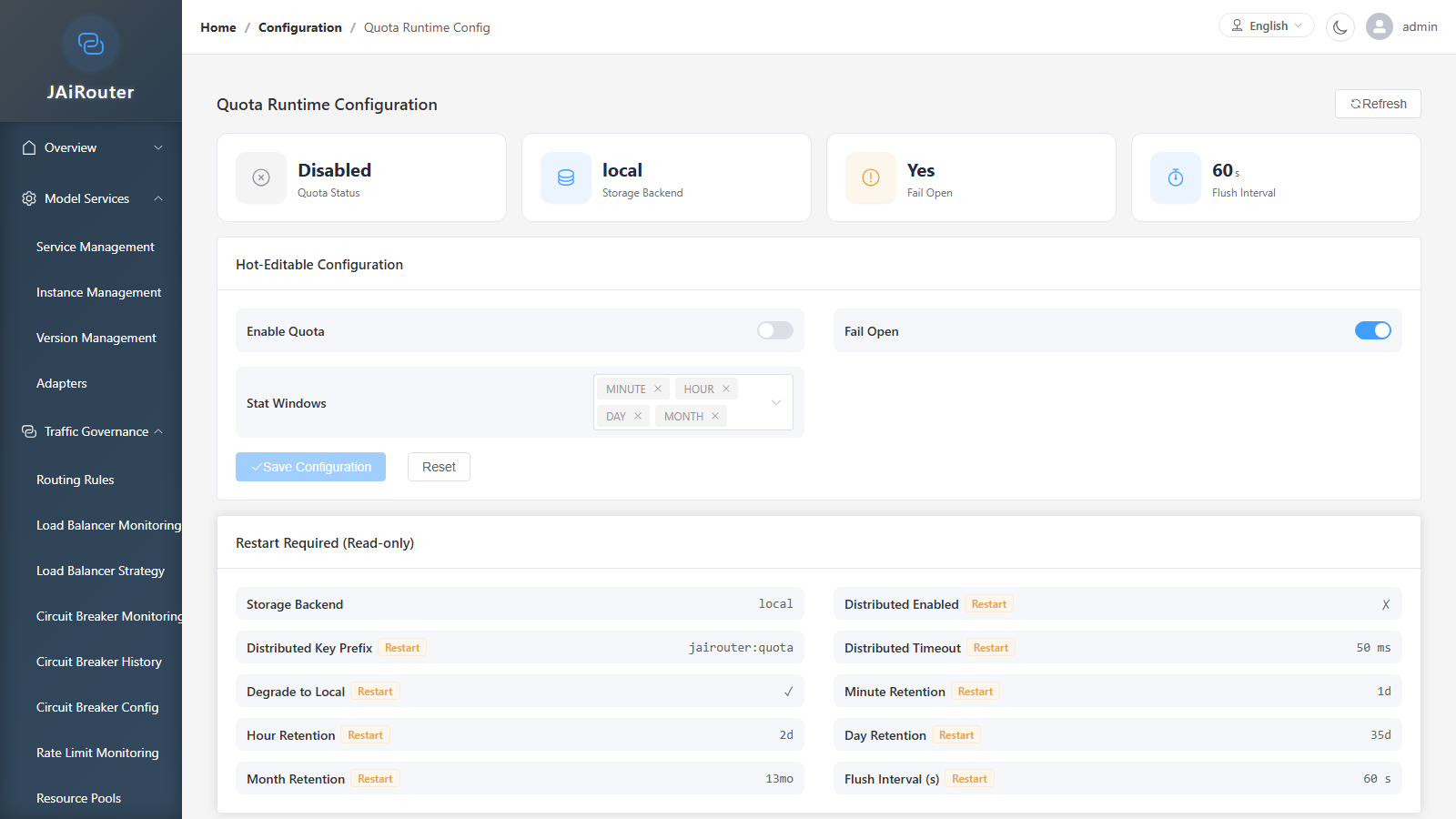
The management console reads quota configuration and applies runtime changes via the following endpoints:
GET Configuration Snapshot
Returns the currently active quota configuration (including in-memory overrides) and labels which fields are hot-editable:
enabled/failOpen/windows— hot-editable fields, currently active runtime valuesflushIntervalSeconds/retention/distributed— read-only display (restart-required, not modifiable via PUT)backendName— current counter backend name (localorredis)hotEditableFields— list of hot-editable field names (enabled/failOpen/windows)restartRequiredFields— list of fields that require a restart (includesflushIntervalSeconds)
Requires the config:quota:read permission.
PUT Runtime Configuration
Partial update — only non-null fields in the request body are modified; null fields remain unchanged.
Hot-editable fields (take effect immediately, in-memory override):
| Field | Type | Description |
|---|---|---|
enabled | Boolean | Enable or disable the quota ledger |
failOpen | Boolean | Allow requests when the ledger fails |
windows | String[] | Enabled window list (e.g. ["MINUTE", "HOUR", "DAY"]) |
Restart-required fields (if any non-null value is sent, the request is rejected with HTTP 400 + errorCode=RESTART_REQUIRED; the message lists the specific field names):
| Field | Description |
|---|---|
distributedEnabled | Enable distributed counting |
distributedKeyPrefix | Distributed Redis key prefix |
distributedTimeoutMs | Distributed Redis command timeout (milliseconds) |
distributedDegradeToLocal | Fall back to local when Redis is unavailable |
retention | Per-window retention periods |
flushIntervalSeconds | Snapshot flush interval in seconds |
An all-null request body results in HTTP 400 + errorCode=INVALID_REQUEST.
On success the response data has the same shape as the GET response. Requires the config:quota:write permission.
Known Limitations
- Runtime changes are in-memory overrides and reset to the yaml values on restart or configuration refresh (same policy as response cache). For persistent changes, edit the
jairouter.quotayaml. flushIntervalSecondsis not hot-editable: this field is classified as restart-required, and PUT requests carrying a non-nullvalue are rejected. The reason: the backend uses@Scheduled(fixedDelayString = "${jairouter.quota.flush-interval-seconds:60}"), which is resolved once when Spring registers the scheduled task; mutating theQuotaPropertiesbean field has no effect on the already-registered schedule. To change the flush interval, update the yaml and restart.- Setting
enabledtotruevia hot-edit causes the ledger to start accumulating for new requests immediately; setting it tofalsestops accumulation, but any in-memory data will still be flushed on the nextflushcycle.
Observability
Runtime Status
GET /api/monitoring/quota/status returns the quota ledger's runtime information:
| Field | Description |
|---|---|
enabled | Whether the ledger is enabled |
backendName | Current counter backend name (local or redis) |
degraded | Whether in a degraded state |
degradedReason | Degradation reason (empty string when not degraded) |
failOpen | Current fail-open setting |
windows | Currently enabled window list |
distributed | Distributed config object (enabled / keyPrefix / timeoutMs / degradeToLocal) |
redisProbe | Present only when distributed.enabled=true: reachable (bool) / status (healthy / degraded / error) / optional reason |
counterMetrics | Present only when distributed.enabled=true: degradationCount (cumulative degradation count) |
Requires the monitoring:quota:read permission.
Usage Query
GET /api/monitoring/quota/usage queries quota usage by dimension and window (read-only, no write side effects).
Query parameters (all optional, default to empty string):
| Parameter | Description |
|---|---|
tenantId | Tenant ID |
apiKeyId | API Key ID |
userId | User ID |
serviceType | Service type (e.g. chat) |
model | Model name |
window | Window type (MINUTE / HOUR / DAY / MONTH; invalid values return 400) |
Response: data is an array where each entry contains:
| Field | Description |
|---|---|
dimensions | Dimension object (tenantId / apiKeyId / userId / serviceType / model) |
window | Window type |
windowStart | Window start time |
requestCount | Request count |
tokenCount | Token count |
When the quota ledger is disabled, data=[] and message=配额账本未启用.
Requires the monitoring:quota:read permission.
Permission Codes
The quota feature introduces 3 new permission codes:
| Permission code | Description |
|---|---|
config:quota:read | Quota configuration status query |
config:quota:write | Quota runtime configuration update |
monitoring:quota:read | Quota runtime status and usage query |
The ADMIN role includes all codes by default; OPERATOR includes read/write codes (excludingsystem:*, security:*:manage and actuator:*); VIEWER includes read codes. The single source of truth for the role templates is RolePermissionSeeder.
Limitations and Roadmap
Current version boundaries:
- Distributed: when
distributed.enabled=true, Redis is the authoritative counter and local degrades to a mirror + fallback; whendistributed.enabled=false(default), counting is only precise within a single instance - Snapshot flushing: in-memory deltas are flushed to the database every 60 seconds by default; the
@Scheduledinterval is fixed at startup and cannot be changed at runtime (flushIntervalSecondsis a restart-required field) - Limit enforcement: the ledger provides the data foundation; actual limit enforcement (
QuotaEnforcementService) endpoints and UI will be delivered in a later PR - Async path: the hot path uses
Mono.block(timeout)to synchronously block Redis calls (default 50ms); full async integration into the Reactor chain is deferred to a later PR